Design → Simulate → Compile
→ Run & Debug,
all in one tool.
Design in the morning, debug in the afternoon.
Raidoxyze is an FPGA design tool driven by Tcl. Build your design from Verilog, IPs and block designs, simulate it, compile it to a bitstream, then load and run it on the board, on your desk or on a Raspberry Pi across the network. The same from a script, a console or the GUI.
Draw your design from IPs and block designs
Drag IPs from the catalog onto a block, connect them, set their parameters: Raidoxyze writes the Verilog. Every action in the diagram is a Tcl command, so a block design is also a script.
- 41 IPs ready to use: gates, counters, multiplexers, memories, an SDRAM controller, bus bridges and protocol state machines, each with its testbench.
- Block designs ready to use: FIFOs, an asynchronous FIFO, a clock divider, APB and AXI memories. Add one as a sub-block or copy it to make it yours.
- Parameters and constraints on a block, with
expressions of them (
$WIDTH,clog2()). - State machines you describe in tables; Raidoxyze writes them.
- IP-XACT in and out: IPs from Vivado and other tools read, your blocks exported.
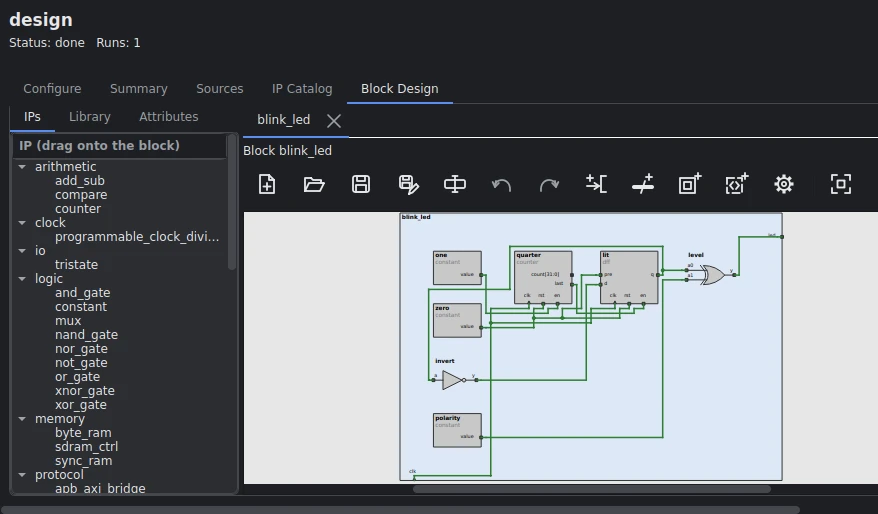
blink_led example, seven IPs.Your laptop compiles, a Raspberry Pi runs the board
Plug the FPGA board into a Raspberry Pi anywhere on your network and keep working on your laptop. Raidoxyze reaches the Pi over ssh: the bitstream and your scripts go there, what they capture comes back into your project.
Your laptop
The Raidoxyze GUI: design, simulate, compile. The project and every result stay here.
Raspberry Pi
Runs the agent Raidoxyze copies over: loads the FPGA, runs your commands and drivers in a session. Nothing to install.
FPGA boards
One Pi can hold several boards, each told apart by its probe's serial number.
- Load there: set
load.hostand the load step copies the bitstream to the Pi, checks the FPGA behind the probe is your part, and loads it. - Run there: a runtime session runs your commands, scripts and drivers on the Pi, their output shown live in the console or the run step's Session tab.
- Bring it back: what they write there (captures, logs, debug data) comes back into the project when you fetch or close.
- Find the boards:
load_scanlists each probe, the FPGA behind it, and the serial ports and SPI buses.
raidoxyze% config load.host pi@raspberrypi
raidoxyze% load
raidoxyze% runtime_open
raidoxyze% runtime_put drivers
raidoxyze% runtime_run capture.py -samples 4096
raidoxyze% runtime_close
One flow, step by step
Each step is a Tcl command with its own configuration. The project database records what each step did, so a step whose inputs did not change is skipped. Click a step to see what it does.
Shaded steps show their screen in the GUI, from
the sdram_check and blink_led example designs
on the Colorlight i9; dashed ones are planned.
Built for engineers who script
Every action is a Tcl command, including every GUI button, so anything you do by hand can be replayed in a script.
Three front ends, one behavior
Batch (raidoxyze -do run.tcl), the interactive console
and the GUI share one interpreter, one configuration and one
project.
A netlist viewer at every stage
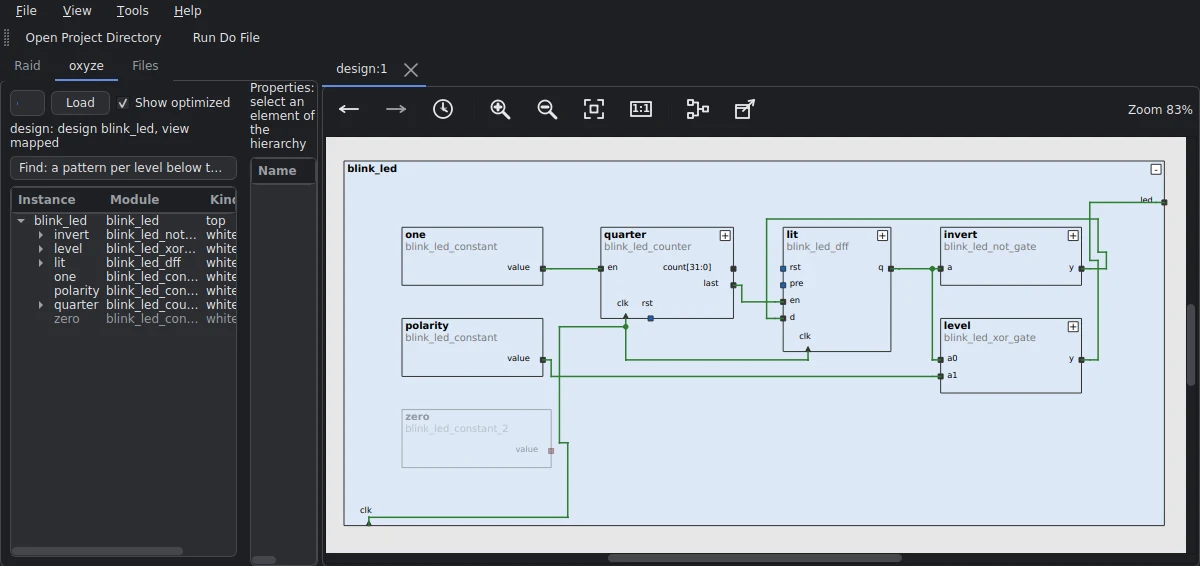
Browse the design's schematic level by level, from the RTL to the placed and routed design, its elements linked back to your names.
Timing you can trust
A built-in static timing analysis checks every routed design. Its results match the place-and-route tools and are never optimistic.
Instrument without touching the RTL
Tie, force or probe any net after analysis, pin assignment or linking. Unused logic is pruned for you.
Dev kits ready to go
Pick a dev kit and the part, pins and programming cable follow. Load an example design and run it on the board in one command.
One file to install
A single program for x86_64 PCs and 64-bit ARM, including the Raspberry Pi 5. No root rights needed.
Supported boards
Choose a board and Raidoxyze sets its part, its pins and how to load it. The example designs run on it in one command.
Colorlight i9
LFE5U-45F (CABGA381) on its extension board. Loaded over USB through the board's own DAPLink probe.
CycloFlex
Earth People Technology. 10CL016 (E144), I/O at 3.3 V, placed and routed with Quartus, loaded with a USB-Blaster.
MAX 10 board
Earth People Technology. 10M04SA (E144), placed and routed with Quartus.
Supported FPGAs
parts taken from design to the bitstream, each checked with its tools.
Lattice
- ECP5
- iCE40
- MachXO2
- CrossLink-NX, Certus-NX
AMD Xilinx
- Artix-7 (35T, 50T, 100T)
- Zynq-7000 (7Z010, 7Z020)
Intel
- Cyclone V
- MAX 10 and Cyclone 10 LP (with Quartus)
What a session looks like
A script runs the flow and each step reports what it did.
$ raidoxyze -do run_simulation.tcl
design top: 3 libraries, 5 files
design done
analyze run: passed, top top, 4 modules
simulate run: tb_top until $finish
PASS: 8 lines matched for 70000 cycles
simulate run: passed at 700026.000 ns